Using Vim Text Editor
Last Updated: 4:30PM, February 19 2025
Vim is a free, open-source, highly efficient command-line text editor used in Unix systems. Vim/ vi
Improved is an improved version of earlier favorite vi. It has five basic and distinct operation modes:
- Normal mode
- Insert mode
- Visual mode
- Command mode
- Ex mode
Normal mode
Normal mode is the default mode. It is the mode you are taken to after you open a file using Vim used for
navigation and manipulation.
Cursor Movement
The mouse or touchpad are not used in Vim, all cursor movements involves the keyboard.
Letters Used in Cursor Movements
| Letter |
Action |
| h |
left arrow key (left) |
| j |
down arrow key (down) |
| k |
up arrow key (up) |
| l |
right arrow key (right) |
Word Jump
These operations involve movements relative to words
Letters Used in Cursor Movements
| Letter |
Action |
| w |
jump to start of next word |
| b |
jump to beginning of previous word |
| e |
jump to end of current word |
Line Movements
Letters Used in Cursor Movements*
| Instruction |
Action |
| 0 |
move to beginning of current line. |
| ^ |
move to first non-blank character of the line. |
| $ |
move to the end of the line. |
Screen Movement
Letters Used in Cursor Movements*
| Instruction |
Action |
| gg |
move cursor to first line of the file. |
| G |
move cursor to last line of the file. |
| H/M/L |
move High (top), move to Middle, move to Low (bottom) |
| U/D |
scroll half page up or down. |
Word Search
Letters Used in Cursor Movements*
| Instruction |
Action |
| /pattern |
search the pattern forward relative to cursor e.g (1,10s/word1/word2/g or %s/word1/word2/g) |
| ?pattern |
search the pattern backwards relative to cursor. |
| n/N |
find next and previous matches. |
Character Search
Letters Used in Cursor Movements*
| Instruction |
Action |
| f{char} |
find the next occurrence of a character on the current line. |
| t{char} |
move cursor to just before the occurrence of the char. |
Command mode
Command mode is a subset of insert mode.
Letters Used in Cursor Movements*
| Instruction |
Action |
| :n |
specify newline** |
| :set nu |
number lines |
| :set nonu |
removes numbers/ undo :nu |
Insert Mode
Insert mode allow editing, modification, navigation and save operations.
Navigation
Unlike in normal mode which is also the standard for navigation, insert mode append (mandatory)
Ctrl to the characters and also support arrow keys.
Letters Used in Cursor Movements*
| Instruction |
Action |
| Ctrl + h |
left arrow key (left) |
| Ctrl + j |
down arrow key (down) |
| Ctrl + k |
up arrow key (up) |
| Ctrl + l |
right arrow key (right) |
Deletion
Letters Used in Cursor Movements*
| Instruction |
Action |
| Backspace/ Ctrl + h |
deletes characters before the cursor. |
| Ctrl + w |
delete entire word before the cursor. |
| Delete |
deletes after the cursor |
Undo
Letters Used in Cursor Movements*
| Instruction |
Action |
| u |
undo |
| U |
undo on the current line |
| Ctrl + r |
undo last operation |
Copy
Letters Used in Cursor Movements*
| Instruction |
Action |
| u |
undo |
| yy/Y |
copy entire line |
| y[n]w |
copy n words |
cut n words
Letters Used in Cursor Movements*
| Instruction |
Action |
| d[n]w |
cut n words |
| [n]dd |
cut n lines |
Paste
Letters Used in Cursor Movements*
| Instruction |
Action |
| p |
paste after the cursor |
| P |
paste before the cursor |
Visual Mode
This mode is primarily used to target specific group of text that does not follow a pattern and
make changes to them. It has three types, line-wise, character-wise and block-wise.
It’s usage is advanced and we will not discuss them here.
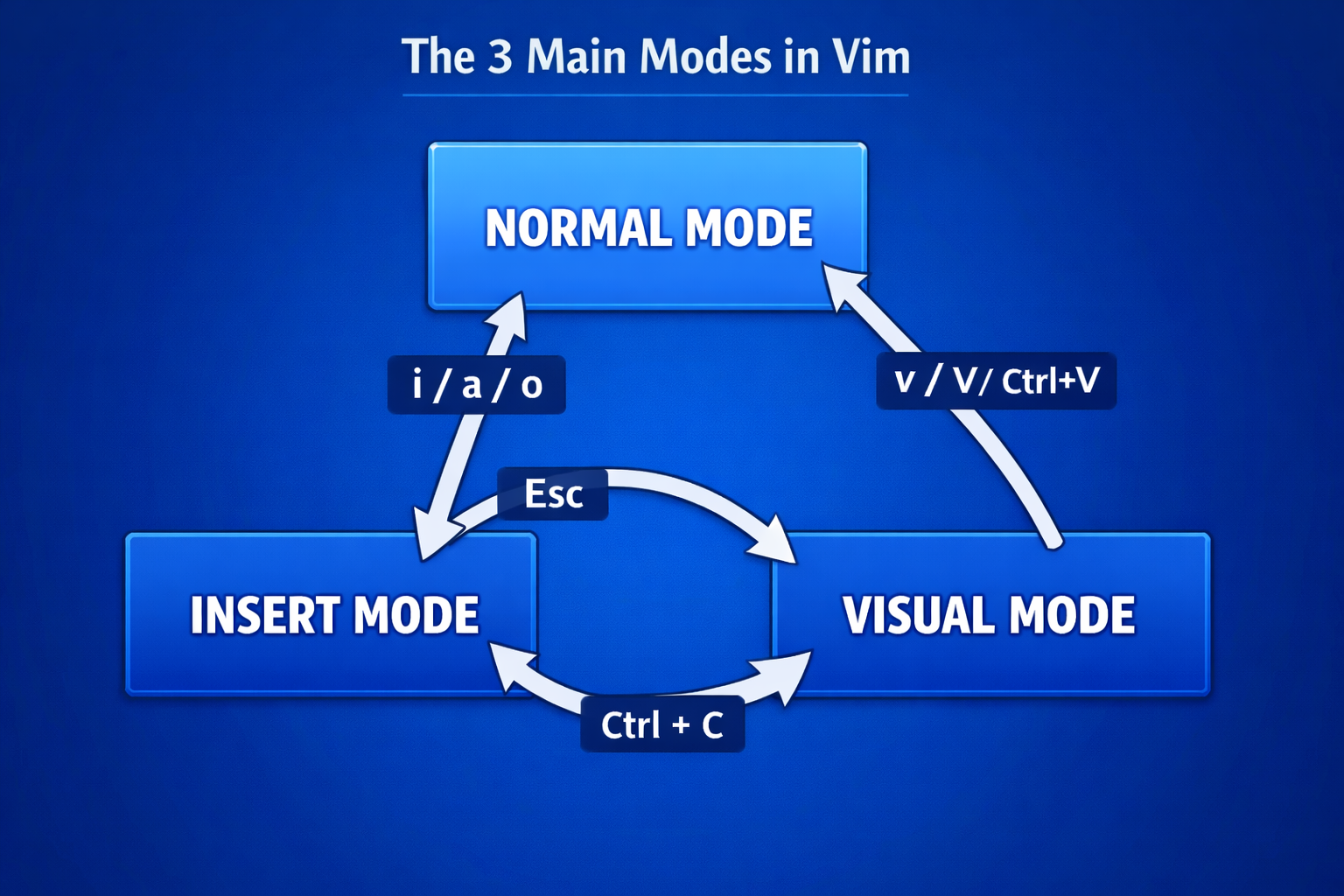
Entering and Exiting Various Modes of Vim
A BareMetal Image
Letters Used in Cursor Movements*
| Instruction |
Action |
| i |
enter insert mode |
| Esc |
exit insert mode. |
Saving and exiting
Letters Used in Cursor Movements*
| Instruction |
Action |
| :w |
save |
| :q |
exit |
| :wq |
save and exit |
| :q! |
force exit |
| :wq! |
force save then exit |
TAGS:
vim,
modes,
editing,
search